Hi gchen,
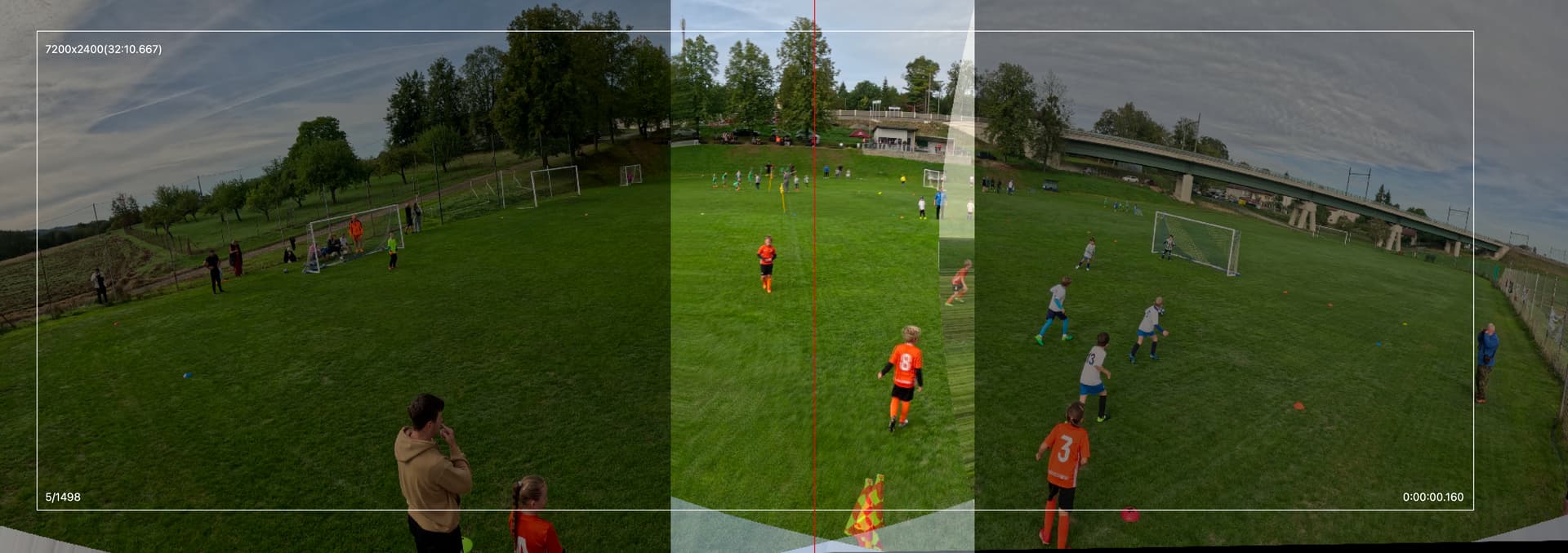
I’m using a fixed dual-camera rig to record youth football matches and have run into persistent parallax and misalignment at the stitch seam. I haven’t been able to resolve it with the calibration data currently available.
My setup:
2x GoPro Hero13 Black cameras mounted on a custom, rigid dual-camera plate. The fixed relative angle and distance between the lenses were designed using GoPro10 technical drawings, and the cameras cannot shift relative to each other.
Tripod height: 4m, positioned ~1.5 m from the sideline, roughly on the halfway line so both goals are covered
Recording settings: 5.3K (5312x2988), 25fps, Wide lens; both cameras are confirmed to use identical settings
Calibration used: the community GoPro13.json profile from the “Ghosting between 2 GoPro 13s” thread (14-coefficient rational distortion model, calibrated for 5312x2988).
The problem: even after running Autocalibrate (Positions > Improve Offsets/Improve Angles), the seam remains consistently misaligned in a way that isn’t motion-related. It appears as a torn or doubled edge on objects relatively close to the rig, such as a mid flag or cone a few meters from the tripod, while the distant background (tree line, buildings) aligns well. This looks like classic parallax caused by the physical baseline between the lenses, rather than a blending or encoding issue. We’ve confirmed the issue is absent from each raw source individually and appears only after stitching; it also persists regardless of seam placement.
Repositioning the seam angle to avoid nearby objects
Adding manual control points. Mixing near and far correspondence points worsened the overall alignment, suggesting a single homography can’t reconcile both depths.
For comparison, I tested the same footage in Mistika VR (trial) using its optical-flow-based stitcher, which resolved the parallax artefact. This suggests the issue can be fixed with proper per-rig calibration or blending, rather than being an inherent limitation of the footage.
Since there’s no calibration specific to a fixed dual-Hero13 rig with this exact geometry, I’d like to request a custom calibration or guidance on producing one for:
Camera: GoPro Hero13 Black (2x)
Resolution: 5.3K (5312x2988)
FPS: 25
Lens: Wide
I’m happy to record checkerboard calibration footage at these exact settings and share it via Google Drive or Dropbox if that would help produce or verify a suitable calibration for this rig.
Thanks for maintaining this tool.
Once we resolve the parallax issue, this will be exactly what we need for match-day stitching.
Daniel
I am sending the source files from the Sunday U9 tournament match for our stitching and calibration tests.
Below is an overview of the attached files and the technical parameters of our 3-metre tripod rig setup.
Rig geometry:
Tripod height: 3 m (U9 field - 37 × 26 m )
Plate tilt: 14.5° (fixed, printed wedge)
Camera yaw spread: ±45° from perpendicular (90° between cameras)
Baseline between lenses: ~10–13 cm
Distance from sideline: roughly 1.5–2 m
Calibration videos:
R_calibration_GX010052.MP4
L_calibration_GX010028.MP4
GoPro13_DS_v1.json ->my own to test calculating calibration
Not perfect, but good enough. The only exception is the red-yellow flag at the center bottom, because it is so close to the camera so it is difficult to eliminate the parallax effect. You can simply move the red dividing line so it doesn’t cross the flag.
Thank you very much for testing this and for the quick reply. The result looks good to me, and moving the red dividing line away from the flag is a simple fix that I will use from now on.
I’d like to add some practical notes from my own experience with this rig, in case they help others.
Setup
Tripod: a 4 m tripod works best for me. I use a heavy studio-light stand, which stays stable even in wind.
Position: the best spot is on the halfway line, 2–2.5 m from the touchline. Please make sure there is no flag or other marker right in front of the camera at the center, because that is where the parallax is strongest.
Height and parallax: the lower the rig, the closer the objects near the touchline are to the cameras, and the stronger the parallax. That is another reason why I prefer 4 m and a distance of 2–2.5 m from the line.
Sun: I place the rig so that the sun is behind the cameras or at their side, not facing the lenses. Low morning or evening sun causes lens flare.
Mounting: I tried a ball head, but screwing the plate directly onto the tripod is more accurate. The plate has a built-in tilt of about 10–12°, and this way the tilt stays exactly as calculated. I also fitted a metal screw into the plate, so I don’t thread the plastic directly onto the tripod every time (the plastic wears out).
Leveling: I glued two small bullseye bubble levels onto the plate and check them after every setup.
Recording
Settings: 5.3K, 25 fps, HEVC, Wide lens, and the same bitrate (High) on both cameras. In one match one camera had High and the other Standard, and it was visible in the video.
Remote control: I start both cameras from my phone with the Camera Tools app.
Sync: I use time sync with a QR code, but it is still worth aligning the frames of the two cameras. With remote start, one camera starts slightly later. In my case, skipping the first 2 frames of the right camera made the ghosting zone at the seam much smoother.
ISO: I set the ISO to a range of 100–800. Morning sun or evening dusk shows clearly at the seam, and a single locked value is the worse option for me than a slightly visible brightness difference.
White balance: the grass tone differs a little between the two cameras at the seam. I plan to try the same fixed white balance on both cameras to reduce it.
Lens mode: both cameras should be on Wide. During a battery swap I once touched the screen by accident and one camera ended up in HyperView. ActionStitch could still stitch it reasonably, but the calibration is made for Wide. I now use the screen lock.
Battery: a battery lasts about 100 minutes, but I swap it when the camera drops below 30%.
Preparation: I prepare everything at home (charging the batteries, erasing the cards), so nothing has to be sorted out on site.
Processing
20 minutes at 5.3K is about 40 GB for both cameras together (GoPro splits each recording into 2 files, so 4 files in total). ActionStitch joins them without any problem.
I stitch to a resolution of 8000x2400.
The processing runs on the CPU, and the CPU usage of one job is only about 20%. A strong GPU would make it much faster, so I’m looking forward to a GPU version. Meanwhile, ActionStitch can be started several times in parallel, so a whole match takes about 3–4 hours. It depends on the computer, mainly on the RAM (each job needs about 3 GB).
I work on a fast SSD and move the finished match to a NAS only after it is done.
I am also continuing with FoloCam. I use it alongside this wide-angle recording, so that I have the whole pitch from the two-camera rig and detailed close-up shots that follow the ball from FoloCam.
Thank you again for your work on both projects. I look forward to more details about FoloCam.